 OpenAlly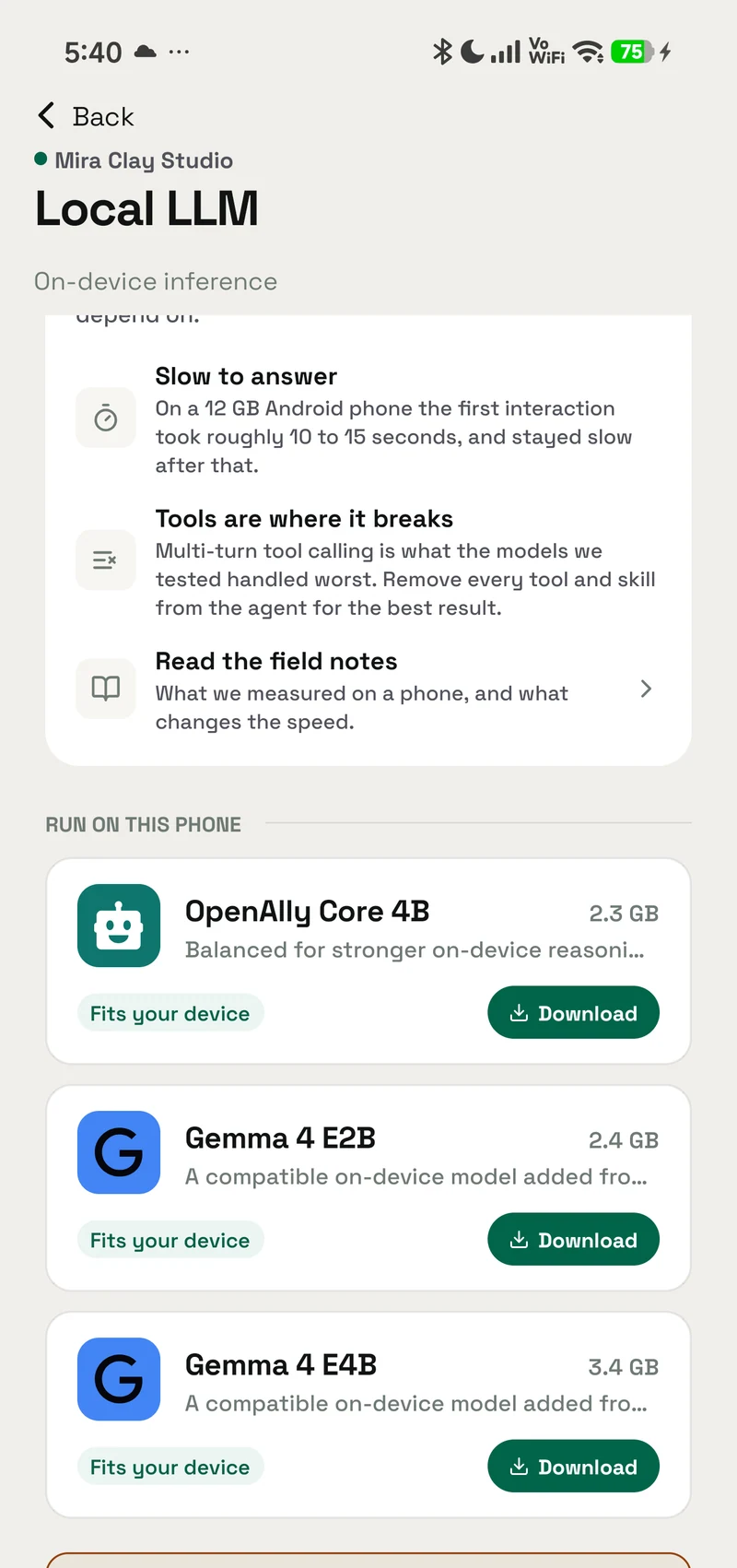
Loading a local language model on Android sounds like the hard part. In our work bringing Gemma 4 to OpenAlly with LiteRT-LM, the trouble started after the model loaded.
An AI agent receives more than the sentence a person typed. Before it can answer, it may also receive operating instructions, conversation history, descriptions of the tools it can use, results returned by those tools, and enough empty space to write a useful response. On a small context window, those pieces compete for the same limited token budget.
Fitting an agent into the context window was harder than fitting the model into memory.
This is our dated engineering account. Plain conversation was good when the prompt fit. In OpenAlly's June–July 2026 tests, however, both Gemma 4 E2B and E4B performed badly at tool calling, especially when a request needed several calls across several turns. That difference shaped the work described below.
Google's Gemma release notes, Gemma 4 announcement, and Gemma 4 model card provide the release and architecture context. The rest of this article explains what those capabilities met inside a working Android agent.
Pinned stack
The exact LiteRT-LM and Gemma 4 packages we pinned
Reproducibility starts with more than a product name. “LiteRT-LM” and “Gemma 4 E4B” can point to different commits, exports, quantisation choices, and compiled context limits over time.
OpenAlly's Android runtime uses the LiteRT-LM project. When this article was published, our runtime was pinned to the exact LiteRT-LM commit 23f36e8, committed on 27 June 2026. Git describes that snapshot as v0.14.0-alpha.0-53-g23f36e8. It is an exact pre-release snapshot after v0.13.1, not a claim that OpenAlly uses a stable v0.14 package.
The underlying engine was pinned to the LiteRT core commit c6de975. On 22 August 2026 the Android runtime moved to LiteRT-LM commit f1ec4db, over LiteRT core b0f6c120. The table records the pins as they stood on 19 August.
| Component | Exact package record verified 19 August 2026 | Why the exact pin matters |
|---|---|---|
| LiteRT-LM | 23f36e802e29bb71397ce0540483ed17e07ce203 | The C interface was evolving, so a commit is more precise than a broad version label |
| LiteRT core | c6de9753d8e03384d390a0f27c37e0537df0b955 | The runtime underneath LiteRT-LM affects delegates, execution, and compatibility |
| Gemma 4 E2B | File revision 6e5c4f1, 2,588,147,712 bytes, SHA-256 181938105e0eefd105961417e8da75903eacda102c4fce9ce90f50b97139a63c | A smaller package gives more phones room for the model, cache, and Android itself |
| Gemma 4 E4B | File revision 28299f3, 3,659,530,240 bytes, SHA-256 0b2a8980ce155fd97673d8e820b4d29d9c7d99b8fa6806f425d969b145bd52e0 | More model capacity also brings greater memory and thermal pressure |
LiteRT-LM
- Exact package record verified 19 August 2026
23f36e802e29bb71397ce0540483ed17e07ce203- Why the exact pin matters
- The C interface was evolving, so a commit is more precise than a broad version label
LiteRT core
- Exact package record verified 19 August 2026
c6de9753d8e03384d390a0f27c37e0537df0b955- Why the exact pin matters
- The runtime underneath LiteRT-LM affects delegates, execution, and compatibility
Gemma 4 E2B
- Exact package record verified 19 August 2026
- File revision 6e5c4f1,
2,588,147,712bytes, SHA-256181938105e0eefd105961417e8da75903eacda102c4fce9ce90f50b97139a63c - Why the exact pin matters
- A smaller package gives more phones room for the model, cache, and Android itself
Gemma 4 E4B
- Exact package record verified 19 August 2026
- File revision 28299f3,
3,659,530,240bytes, SHA-2560b2a8980ce155fd97673d8e820b4d29d9c7d99b8fa6806f425d969b145bd52e0 - Why the exact pin matters
- More model capacity also brings greater memory and thermal pressure
These are the packages in OpenAlly's Android model catalogue as verified on 19 August 2026. The exact revisions and hashes make the model bytes reproducible instead of relying on a moving filename or a broad family label. The performance and tool-calling findings below come from our June–July 2026 Galaxy S26 Ultra test cycle.
On 19 August 2026, OpenAlly's in-app model catalogue gave E2B an 8,192-token window. E4B started at 4,096 with an 8,192-token package ceiling. The app used 6 GiB and 8 GiB device-memory floors for E2B and E4B respectively. Those are OpenAlly safety gates, not universal Android requirements published by Google.
There are three context numbers worth keeping separate. Google's core model card lists a 128K architectural context for E2B and E4B. The current E2B and E4B LiteRT-LM package pages document support up to 32K. OpenAlly's in-app catalogue then chose an 8,192-token ceiling for these mobile packages. An architecture ceiling, a downloadable package ceiling, and an app's operating limit are not the same promise.
Context budget
A local model sees far more than your message
Tokens are small pieces of text that a model reads and writes. A context window is the maximum working space for those pieces during a request.
Imagine a 4,096-seat room. Your message may need only nine seats, but the agent's instructions, conversation, and tool descriptions enter first. A tool description carries a machine-readable name, purpose, argument fields, allowed values, and usage guidance. The model reads that schema before it chooses whether to call the tool.
On 21 July 2026, one OpenAlly prompt reported this budget against that same earlier 4,096-token export:
| Prompt part | Estimated tokens |
|---|---|
| Tool schemas for 15 tools | 2,825 |
| History sent on the wire, including the system instructions | 5,612 |
| System instructions within that history | 5,483 |
| New user message | 9 |
| Actual wire total | 8,446 |
| Artifact context window | 4,096 |
Tool schemas for 15 tools
- Estimated tokens
- 2,825
History sent on the wire, including the system instructions
- Estimated tokens
- 5,612
System instructions within that history
- Estimated tokens
- 5,483
New user message
- Estimated tokens
- 9
Actual wire total
- Estimated tokens
- 8,446
Artifact context window
- Estimated tokens
- 4,096
The 5,483 system tokens are already inside the 5,612 history tokens. Adding them again would double count them. The correct total is the recorded wire total: 8,446 tokens trying to enter a 4,096-token window.
As a ratio, the request was 206% of the window (8,446 divided by 4,096), and 4,350 tokens never got through the door. That is more than the entire window again, discarded before the model had written a single character of an answer. The nine tokens the person actually typed were competing for seats with a queue twice the size of the room.
That also explains why starting a fresh chat did not solve the underlying case. Most of the budget was spent before a long conversation had developed.
What reached the 4,096-token door
Measured token budgetThe 4K window was already overfull
- Tool schemas
- 2,825
- History on wire
- 5,612Includes 5,483 system tokens
- Wire total
- 8,446
The system prompt sits inside the wire history. It is shown for diagnosis, not added a second time.
Input reaches the limit before a reply can begin.
Fewer, shorter schemas leave space for the answer.
Control test
Removing the tools made the conversation work
We ran the most useful control test: same phone, same model path, same runtime, but with all tools removed from the prompt. The model produced a real response.
That narrowed the fault to the request rather than the model: it could load and generate; what surrounded it was too large.
Removing tools is not a complete agent solution. It removes the schemas, which gives the model room to talk, but it also removes its ability to take actions. A useful on-device agent has to keep both sides of that trade:
- Select a smaller working set of relevant tools for each turn.
- Use terse schemas that preserve essential meaning.
- Reserve 1,024 tokens for the answer instead of filling every seat with input.
- Cap verbose tool results before they re-enter the conversation.
- Carry only the history that remains useful for the next decision.
The goal is fewer instructions competing at once, not fewer capabilities. A business agent may know hundreds of possible actions while showing the local model only the small set needed for the current request.
Field performance
Google's lab numbers and OpenAlly's field result
Google has published Android measurements for Gemma 4 E2B and E4B with LiteRT-LM. The table below reproduces those reference figures with their test shape: 1,024 input tokens for prefill, 256 output tokens for decode, a 2,048-token context, and warm caches. These are Google-published reference numbers, not OpenAlly measurements.
| Model and backend (S26 Ultra) | Prefill tokens/s | Decode tokens/s | Time to first token |
|---|---|---|---|
| Gemma 4 E2B, CPU | 557 | 46.9 | 1.8 s |
| Gemma 4 E2B, GPU | 3,808 | 52.1 | 0.3 s |
| Gemma 4 E4B, CPU | 195 | 17.7 | 5.3 s |
| Gemma 4 E4B, GPU | 1,293 | 22.1 | 0.8 s |
Gemma 4 E2B, CPU
- Prefill tokens/s
- 557
- Decode tokens/s
- 46.9
- Time to first token
- 1.8 s
Gemma 4 E2B, GPU
- Prefill tokens/s
- 3,808
- Decode tokens/s
- 52.1
- Time to first token
- 0.3 s
Gemma 4 E4B, CPU
- Prefill tokens/s
- 195
- Decode tokens/s
- 17.7
- Time to first token
- 5.3 s
Gemma 4 E4B, GPU
- Prefill tokens/s
- 1,293
- Decode tokens/s
- 22.1
- Time to first token
- 0.8 s
Those eight figures are published on the E2B and E4B LiteRT-LM package cards, at the exact revisions pinned above, and every row is measured on an S26 Ultra, though the cards do not name a regional variant. Google's LiteRT-LM performance write-up covers the same work in round numbers and sends readers to those cards for the per-device detail. The cards are also explicit about what the fastest column leaves out: time-to-first-token does not include load time, the benchmarks ran with caches enabled and initialised, and first-run latency and memory may differ. So 0.3 s is the distance between an already-loaded model and its first token, not the wait after a person chooses a model. The table still shows why accelerated prefill matters, because the phone reads a long prompt far faster before it starts writing. It does not promise the same speed for every phone, artifact, prompt, temperature, thermal state, or agent workload.
Our Galaxy S26 Ultra (SM-S948B) test used 12 GB of RAM. GPU-only inference ran, but the first interaction took roughly 10–15 seconds and throughput was poor. The model was running locally and producing output; it simply was not close to the responsiveness an everyday OpenAlly agent needs. For OpenAlly's daily agent workload, that observed speed was the result that mattered.
Reference speed beside the field result
S26 Ultra reference benchWhat the same phone class can do in a controlled run
| Model | Backend | Prefill tokens/s | Decode tokens/s | TTFT seconds |
|---|---|---|---|---|
| Gemma 4 E2B | CPU | 557 | 46.9 | 1.8 |
| Gemma 4 E2B | GPU | 3,808 | 52.1 | 0.3 |
| Gemma 4 E4B | CPU | 195 | 17.7 | 5.3 |
| Gemma 4 E4B | GPU | 1,293 | 22.1 | 0.8 |
- Prefill
- How quickly the prompt is read.
- Decode
- How quickly answer tokens are generated.
- TTFT
- Time to the first token; model load is excluded.
CPU uses XNNPACK with four threads. Google measured with initialized caches; the first run can differ.
Memory pressure
Twelve gigabytes of RAM did not mean twelve free gigabytes
The 4.58 GB model file from the June test (an earlier export compiled for a 4,096-token window, not one of the packages pinned above) was only one part of the memory bill. At runtime, Android still needs memory for the operating system, OpenAlly, model working buffers, converted weights, the key-value cache that holds context, and the graphics or CPU backend.
In one June E4B load attempt, Android reported roughly 5.2 GB available memory and the process failed under memory pressure. That is one observation on one device and artifact, not a universal minimum-RAM rule. It taught us to consider available memory and runtime headroom rather than comparing the download size with the number printed on the phone's box.
The context limit created a separate failure. That earlier export had been compiled for 4,096 tokens. Forcing a 32,768-token setting could not create a larger model cache after the fact; it drove execution beyond the artifact's safe attention-mask bounds. The durable rule is to respect the context capacity packaged into the artifact.
GPU execution solved only one part of the problem. In our test, the model ran on the GPU path and still felt slow: roughly 10–15 seconds for the first interaction, followed by poor generation throughput. A local-agent benchmark has to measure the experience around the model, not just confirm that a GPU delegate opened.
Agent test
Why multi-turn tool calling was the harder test
Plain chat asks the model to read and respond. A multi-turn agent task may ask it to:
- Choose the correct tool.
- Produce valid structured arguments.
- Read the tool result.
- Decide whether another tool is required.
- Preserve the user's intent across the growing history.
- Finish with a useful answer rather than another unnecessary call.
Every result adds tokens. Every round creates another chance to choose the wrong tool, lose an argument, or stop early. In our June–July 2026 tests, general conversation was good once the prompt fit, but Gemma 4 E2B and E4B both performed badly at multi-turn tool calling. E2B regularly damaged tool names or arguments. E4B's extra capacity did not make the full OpenAlly chain dependable once schemas, returned data, and history accumulated. These were direct results from our Android tests in OpenAlly's tool-heavy agent environment.
Google's structured tool-use guide explains the expected call loop for the model. Its Gemma 4 edge-agent work also shows active progress toward useful local actions.
One lesson from Google's FunctionGemma fine-tuning guide is especially relevant: correct function-call syntax and dependable task intent are different skills. A model may know the shape of a call while still benefiting from examples that teach which tool sequence solves a real workflow.
Where the multi-tool run lost state
Multi-turn tool traceThe conversation worked. The tool chain lost the thread.
- Test path
- GPU-only
- First interaction
- ~10–15 s
- Observed speed
- Poor throughput
- Multi-turn reliability
- E2B + E4B unreliable
User requestTurn 1 Find the remaining Keratin Repair kit, create Meera’s order, then send her a payment link.
Tool call 1Inventory inventory_lookupkey: “keratin-repair”Tool resultSucceeded - Item
- Keratin Repair
- Stock
- 2 units
- Price
- ₹1,250
Tool call 2Order business_order_createMeera · 1 item · ₹1,250Result returns and joins the growing conversation state.
Expected tool call 3Not completed order_payment_linkOrder state or tool arguments drifted before checkout.The agent did not reliably finish the chain after another call-and-result round.
Direction
What should improve from here
The opportunity remains strong because the weak points are concrete rather than mysterious.
Larger safely packaged context gives instructions, selected tools, results, and answers more room, provided the memory cost remains suitable for a phone. Stronger accelerated backends can reduce prompt-reading time and make local interaction feel immediate. Better native tool support can improve structured calls without surrounding the model with so much explanatory text. Specialised routing and fine-tuning can teach a compact model the smaller set of actions that matter for a particular task.
Google is approaching on-device Gemma from more than one direction. LiteRT-LM gives developers direct runtime and packaging control. Android's Gemma 4 AICore developer preview represents a separate system-managed path. Those approaches can move at different speeds, but both increase the pressure for clearer backend reporting, dependable tool calls, and efficient context use.
OpenAlly's direction follows the evidence: keep normal conversation natural, select only relevant actions per turn, protect answer space, constrain tool-result growth, and measure the backend that actually ran. How an on-device route sits beside provider keys, your own server, and OpenAlly Cloud is set out in the trust and control guide.
For the reader's-eye version of the same trade, covering what a phone runs offline on Android and iPhone and where acting on real accounts becomes the harder half, see AI on your phone: what runs offline and what real work takes.
A more capable local-agent path
On-device directionA capable local agent needs progress on both sides
- 01OpenAllySelect tools per turn
Send the small working set that matches the request, not the whole toolbox.
- 02OpenAllyShorten schemas and results
Spend fewer input tokens so the model has room to reason and answer.
- 03Google / Android stackPackage a larger safe context
Make the advertised model window dependable across Android backends and artifacts.
- 04Google / Android stackStrengthen multi-turn function calls
Keep tool syntax, state and routing reliable across several call-and-result rounds.
Questions
Frequently asked questions
Can Gemma 4 run fully on an Android phone?
Yes. Gemma 4 has official on-device packages and Android runtime paths. Whether a specific package runs well depends on the device, available memory, packaged context, backend support, and workload. Loading the model and running a multi-tool agent are different levels of difficulty.
Which Gemma 4 model does OpenAlly use on Android?
The selected official packages verified on 19 August 2026 are Gemma 4 E2B and E4B LiteRT-LM exports. Their exact repository revisions, byte sizes, and SHA-256 values appear in the pin table above. OpenAlly can choose the package that suits the phone's practical memory headroom.
Why do AI tools use so many tokens before they run?
The model needs a description of each available tool, including its purpose and structured arguments. Those schemas are prompt text. Fifteen detailed tools can consume thousands of tokens even when the model ultimately calls only one.
What worked well, and what failed, in OpenAlly's tests?
Plain conversation and general-purpose answers were good when the prompt fit. Tool use was the failure point: in OpenAlly's June–July 2026 tests, Gemma 4 E2B and E4B both performed badly at choosing and chaining tools for daily agent work. The context budget, schema load, tool results, and multi-turn decisions made that workload much harder than chat.
How fast was OpenAlly's Galaxy S26 Ultra test?
GPU-only inference ran, but the first interaction took roughly 10–15 seconds and throughput was poor. Google's E2B GPU reference reaches a first token in 0.3 s, but that figure excludes model load time and runs with caches already initialised, so it is not the wait a person feels after choosing a model. OpenAlly's field workload produced a much slower user experience.
Field lesson
The hard learning
On-device AI is often discussed as a model-size contest: can the weights fit, and how many tokens per second can the phone produce? An agent adds a more important question: after the instructions, tools, results, history, and reply reserve are counted, is there enough useful context left to do the job?
On 21 July, removing the tools turned a failed request into a real conversation on the same device. That single test changed the engineering focus: treat context as a strict product budget, rather than abandoning local models or pretending every tool could fit.
Gemma 4 and LiteRT-LM make serious local Android inference possible. Building a dependable local agent on top takes the less glamorous work too: exact package pins, verified backends, safe memory margins, compact schemas, selective tools, bounded results, and honest measurements.
Sources and references
These public pages support the product facts, technical specifications, background, and reference measurements in this article. Details were checked on the review date shown above.
- Gemma release notes
- Gemma 4 announcement
- Gemma 4 model card
- LiteRT-LM Android performance
- Gemma 4 agentic skills on the edge
- Function calling with Gemma 4
- FunctionGemma fine-tuning guide
- LiteRT-LM repository
- OpenAlly LiteRT-LM runtime pin until 22 August 2026
- OpenAlly LiteRT-LM runtime pin from 22 August 2026
- OpenAlly LiteRT core pin until 22 August 2026
- Gemma 4 E2B LiteRT-LM package
- Gemma 4 E4B LiteRT-LM package
- Gemma 4 in Android AICore
Read us on your terms
Google lets you name the sites you want to hear from. Add OpenAlly and these articles surface more often in your own Search results — your preference, revocable from the same screen, and it changes nothing for anyone else.