 OpenAlly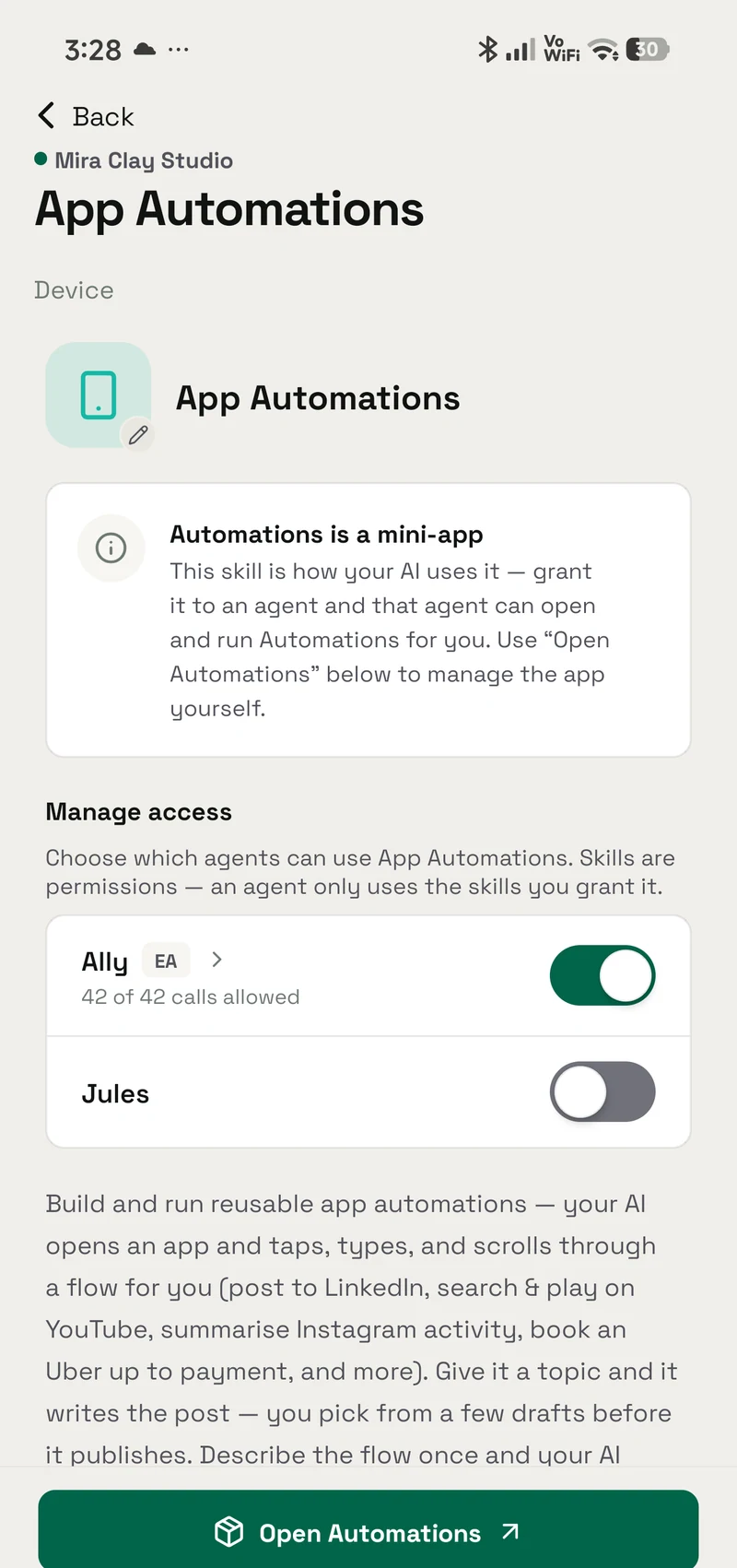
An assistant that only talks needs nothing else on your phone. Ask it to post an update or book a ride, and that changes. It now needs a way into an app you already use. On Android the phone grants that reach, and Google Play policy sets the limits. The policy is clear about what an app may decide for you.
01 / Decision
Short answer
In brief: an AI agent can act inside your other apps only where the phone and the store allow it. Google Play bars an app from acting on its own through the Accessibility API. It allows a fixed script that a person wrote. In OpenAlly, two features work inside the screens of your other apps, App Automations for saved flows and Aster screen control for one-off tasks, and both drive the screen through Aster, a second app you install yourself on Android.
Google Play's accessibility policy says that "Any use of the Accessibility API that enables an app to autonomously initiate, plan, and execute actions or decisions is strictly prohibited." The next sentence carves out an exception. It reads: "This does not prohibit deterministic, rule-based automation, where behavior follows a static, human-defined script." So the line sits between deciding and following.
App Automations is the OpenAlly feature that opens your other apps and works them for you, and it is listed for Android. Its catalogue entry says your AI "opens an app and taps, types, and scrolls through a flow for you". It also says the feature "hands off to you at logins and payments", and that "Every trigger has a daily ceiling you set". The Google Play listing states the boundary in one line: "It never pays, and never sees your password." Payments and passwords stay with you.
Driving the screen itself happens in that separate, optional install. Aster is a companion app you put on the same Android phone yourself, from outside the Play Store, and grant on its own. App Automations needs it too: its catalogue page says it "reaches the screen through the Aster companion".
Where the agent runs, and whether it works without a signal, are different questions from this one. The table near the end of this guide points to both answers.
02 / How it works
How touching another app actually works
There are three kinds of reach. They hand over very different amounts.
- Its own chat. The agent reads what you typed and writes back. It can think, summarise and draft. It cannot see or change anything in Instagram, your bank or your calendar.
- A connected account. You sign in once and let the agent use a service through the door that service provides. The scope is whatever the service chose to expose. You can revoke it there.
- Working the screen of another app. The agent reads what is shown, then taps, types and scrolls the way you would. On Android that reach usually comes through the Accessibility API, the interface that lets an app read what is on screen and act on it. It needs no help from the app's owner. That is why it reaches furthest, and why it is watched most closely.
This third kind is what people mean by an AI agent that controls their phone. It is the one with a written policy attached: Google Play's policy on the AccessibilityService API, quoted in the next section.
03 / Store policy
What Google Play allows
Google draws its line around autonomy. The policy does not ban automation as such. The Accessibility API is the Android interface that lets an app read what is on screen and act on it. Google's rule is about what an app decides to do with that reach.
Play Console Help names the banned behaviour directly: "Any use of the Accessibility API that enables an app to autonomously initiate, plan, and execute actions or decisions is strictly prohibited." That sentence is about deciding, not about tapping.
The permitted behaviour comes next: "This does not prohibit deterministic, rule-based automation, where behavior follows a static, human-defined script (for example, 'If Trigger X occurs, perform Action Y')." So a fixed script is allowed. The same page adds a scope test. It says that "Apps using the Accessibility API for automation purposes must ensure that all actions performed on a user's behalf are for a narrow and clearly understood purpose."
A second Play policy page covers the paperwork. It says the Accessibility API "is not designed and cannot be requested for" remote call audio recording. The same bar applies to an app that autonomously initiates, plans and executes actions or decisions. The page also requires that "The use of the Accessibility API must be documented in the Google Play listing". An app that has not declared itself an accessibility tool has more to do. It must complete a declaration in Play Console. It must also show a clear in-app disclosure and ask for consent.
This is a rule about a behaviour, not about a kind of company. An app that picks its own course of action across your apps is out. An app that follows steps a person set out is in. The policy says both things in the same paragraph. The declaration language on that page still highlights 3 November 2021. That was when apps targeting API level 31 with an accessibility service first had to file a policy declaration.
04 / App Automations
What OpenAlly App Automations does
The catalogue entry for App Automations names the flows it ships with: post to LinkedIn, search and play on YouTube, summarise Instagram activity, book an Uber up to payment. For example, you give the LinkedIn flow a topic and it writes the post, and you pick from a few drafts before it publishes.
The catalogue describes the first run in one sentence: "Describe the flow once and your AI walks it on the real screen to learn the steps, then replays them fast and deterministically."
The Automations screen offers two ways to create one. Record with AI has your assistant open the app and demonstrate the flow; when you have described a goal instead, Build it from your goal has it work toward that goal step by step and record what it does. Build it step by step has you add each action yourself in the editor, with no recording. A recorded flow then waits for you: the app lists the captured steps and says "Nothing replays until you save."
After that first run:
- Replay is deterministic, and it self-heals a step if the app changes.
- It hands off to you at logins and payments.
- You can schedule one. You can also have it run when something happens on your phone: "a shake, a plug-in, an app opening, a track changing, a notification your Flare rule matched".
- "Every trigger has a daily ceiling you set, and a triggered run can only get things ready for you: it never buys anything."
- It runs on-device, with your confirmation.
The Play listing says the same thing in customer language: "It self-heals when the screen changes and hands control back to you at logins and payments. It never pays, and never sees your password." Those are the two hand-off points.
The feature catalogue puts it in one line: "Turn familiar Android app flows into repeatable shortcuts, with your review at logins, payments, and other sensitive steps." Before you set one up, check where it stops. For example, the Uber flow gets a ride ready up to payment and then waits for you. A flow that finished the booking would be doing something else. That boundary is set by the design, not by how the flow is worded.
05 / Android control
Optional Aster screen control
Screen control on Android does not arrive with the main app. Aster is a separate companion that you install yourself, from outside the Play Store, on the same phone. OpenAlly's catalogue describes what it adds once you allow it: "drive your screen to complete multi-step tasks for you, all on-device with your confirmation." Grant that access and you grant Aster alone. You can stop Aster on its own without disturbing anything else.
Google's policy language above applies to any app that uses the Accessibility API. Assessing a particular app against it is Google's job. What we can state is the product shape. Aster is optional. It is installed on its own, granted on its own and stopped on its own. Screen control is scoped to Android rather than to OpenAlly as a whole. OpenAlly itself is a cross-platform product, and the download page is the source of truth for where it runs.
Screen control is a separate grant
Android + Aster workbenchAndroid-specific, by design
- Separate companionOpenAlly stays cross-platform
- Permission by choiceYou decide what it may use
- Visible stopEnd the action from the screen
- Open sourceInspect Aster separately

06 / Google's own path
What Google ships on some flagship phones
Google has its own path on a few phones. Its Gemini Intelligence support page says Gemini "can help you automate multi-step tasks across select Android apps, like ordering groceries, making reservations or shopping online." The list of phones is short. As of 31 August 2026 that page lists Samsung Galaxy Z Fold8, Samsung Galaxy Z Fold8 Ultra, Samsung Galaxy Z Flip8, Pixel 11, Pixel 11 Pro, Pixel 11 Pro XL and Pixel 11 Pro Fold. The stated requirement is 12GB+ RAM. The page also notes that individual features "may vary by country and language" and that "Features may also vary by device type." If you carry one of those phones, that route is open to you without installing anything.
07 / Three questions
Three different questions about a phone agent
These three get collapsed into one. They come apart the moment you put a phone agent to work.
| The question | What it decides | Where we answer it |
|---|---|---|
| Where does the agent run? | Whether a second machine has to stay switched on | An AI agent on your phone without a PC |
| Does it work without a connection? | Which requests survive a dead signal | What a phone can do offline and running a model on an Android phone |
| May it touch your other apps? | Whether it can act outside its own chat | This article |
Where does the agent run?
- What it decides
- Whether a second machine has to stay switched on
- Where we answer it
- An AI agent on your phone without a PC
Does it work without a connection?
- What it decides
- Which requests survive a dead signal
- Where we answer it
- What a phone can do offline and running a model on an Android phone
May it touch your other apps?
- What it decides
- Whether it can act outside its own chat
- Where we answer it
- This article
An agent can run entirely on your phone and still have no permission to open Instagram. It can work Instagram well and still need a signal for every reply. Two comparisons walk the same three questions against named products, OpenAlly and CellClaw and OpenAlly and FoneClaw. The small-business guide shows what this reach is for once you have it.
08 / Questions
Frequently asked questions
Can an AI agent control my phone without approving each step?
Google Play's accessibility policy prohibits an app that uses the Accessibility API to "autonomously initiate, plan, and execute actions or decisions". It also requires that automated actions be "for a narrow and clearly understood purpose". OpenAlly's App Automations entry describes itself as running "On-device, with your confirmation". It hands off at logins and payments, and it gives every trigger a daily ceiling you set.
Do I need the Aster companion to use OpenAlly?
No. Aster is optional and separate, but App Automations and Android screen control both run through it. You install it yourself on the same Android phone, from outside the Play Store, and grant it screen access on its own. Without it you still get the rest of OpenAlly.
Can an automation buy something while I am not looking?
The catalogue is explicit that a triggered run "can only get things ready for you: it never buys anything". The Google Play listing says "It never pays, and never sees your password." Payments and logins hand control back to you. Every trigger has a daily ceiling you set.
What exactly does Google Play prohibit?
Autonomy, in the narrow sense of an app that initiates, plans and executes actions or decisions by itself through the Accessibility API. Deterministic automation that follows a static, human-defined script is carved out in the same policy paragraph. A second page requires that any use of the Accessibility API be documented in the Google Play listing. Apps that are not accessibility tools also need a Play Console declaration and an in-app disclosure.
Sources and references
These public pages support the product facts, technical specifications, background, and reference measurements in this article. Details were checked on the review date shown above.
Read us on your terms
Google lets you name the sites you want to hear from. Add OpenAlly and these articles surface more often in your own Search results — your preference, revocable from the same screen, and it changes nothing for anyone else.